LaunchCommand
Give the launch a sequence you can follow.
Build a source-backed launch strategy, generate channel-specific content, and optionally turn tasks into finished slides through TeaserPro.
$27 one-time app access · AI provider usage is separate.
Your workflow
From starting point to something useful.
Approve the campaign brief
Add your intended readers, reader promise, destination link, available assets, and spoiler boundaries. Review the strategy before generating.
Build a manageable schedule
Choose channels and pieces per week. Review dated tasks and resume unfinished content after an interruption.
Prepare the finished assets
Use the copy and calendar on their own, or optionally send slideshow tasks to TeaserPro for editable slides, artwork, and paid video clips.
A concrete example
See what the workflow looks like.
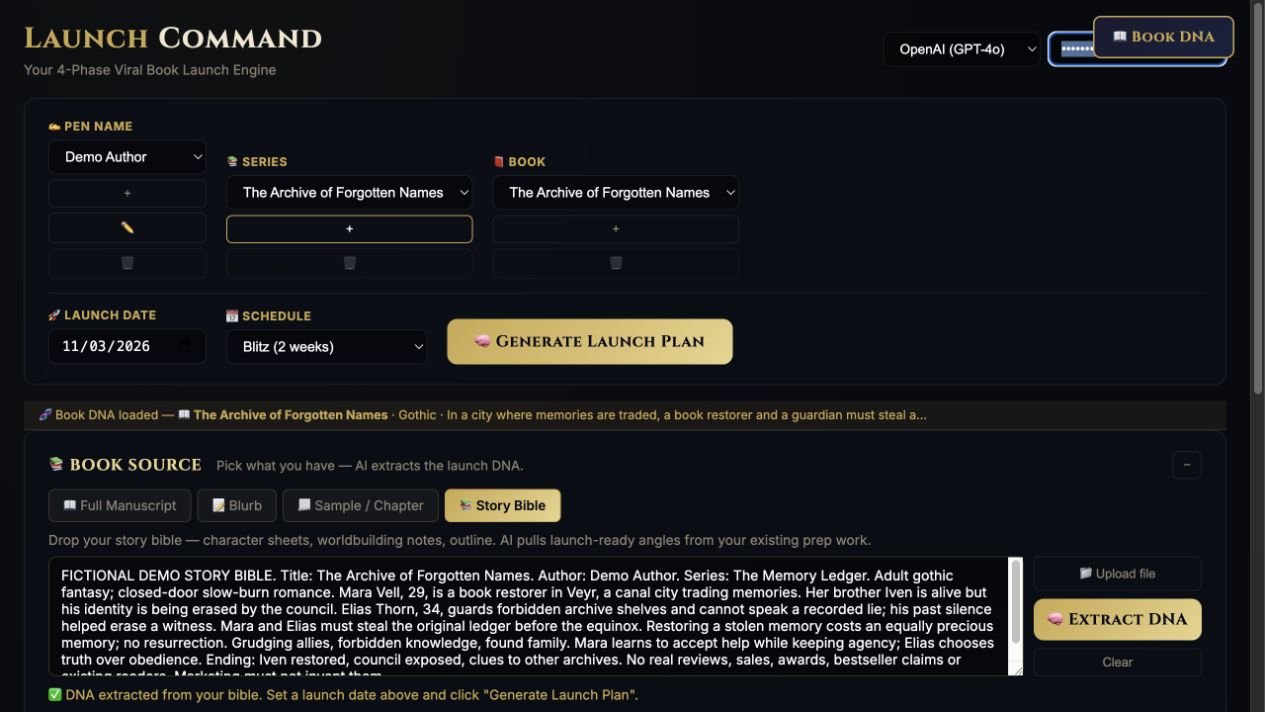
The walkthrough extracts Book DNA for The Archive of Forgotten Names and builds a Blitz campaign across three platforms. It reviews the four phases and flags unsupported promotional claims before use.
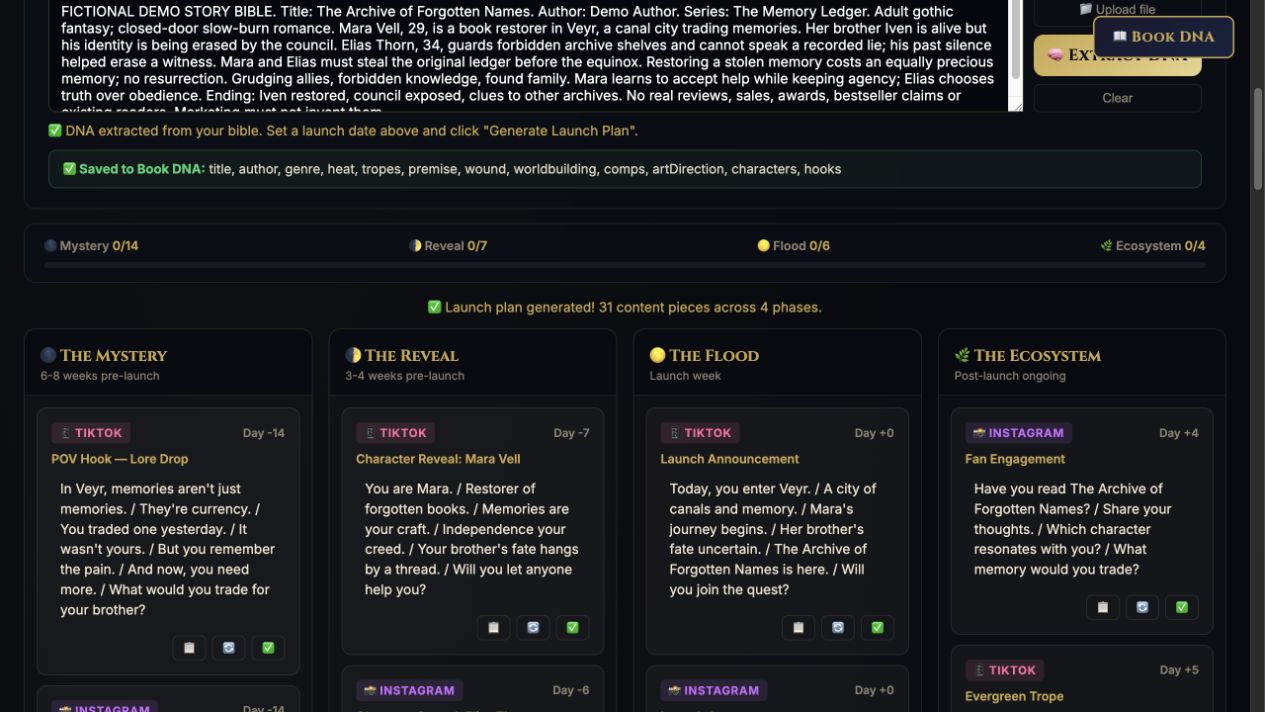
Screenshots show the actual app interface. Book and author examples are fictional. Setup screens are labeled separately from generated results; interface details may vary by edition.
What you can do
A focused tool for a specific job.
- Strategy before copy
- Review distinct angles with references to your approved source.
- Content with a purpose
- Generate discovery, reader connection, conversion, and follow-up posts with a clear invitation.
- A dated plan
- Adjust fixed and relative dates; export CSV or an .ics calendar.
- Recoverable work
- Resume unfinished items and keep saved workspace versions. Export a project backup.
- Optional TeaserPro connection
- Create editable slides with text backgrounds, then add artwork or explicitly choose paid video generation.
- Assets attached to tasks
- Return finished images or clips to the original task, with a warning when its brief or copy changes.
Learn before you choose
Watch the tool in use.
Under one minute · Actual app captures · AI narration · English captions
This video shows the earlier calendar workflow. The strategy brief, recovery controls, and optional TeaserPro handoff are covered in the updated written guide.
Read the overview transcript
LaunchCommand — overview Fictional demonstration. Actual app captures. AI narration. A launch needs more than a reminder to post. LaunchCommand uses your book information and release date to draft a four-phase content plan: Mystery, Reveal, Flood, and Ecosystem. Here, a fictional book has a populated calendar with TikTok, Instagram, and Substack cards. Choose a manageable schedule, review the story details and timing, then copy the posts you want to prepare. Add your real links and assets before publishing through your own channels. The app plans content; you control what goes live. Bring your own supported AI key and watch the full LaunchCommand walkthrough in the Darkling tool tutorial library.
Before you start
What you need.
LaunchCommand works on its own. The optional production connection requires TeaserPro access separately unless your membership includes both tools. Different sites use handoff/result files. Provider usage is separate; nothing publishes automatically.
AI access and usage
Connect a supported AI provider as shown in your edition. App access and AI usage are separate; provider availability and costs depend on your account. Read the API setup guide.
Keep a reviewed copy
Check the work against your actual project, then save or export the material you want to keep. Your final editorial and publishing choices remain yours.
LaunchCommand
Put the tool to work.
One-time app purchase.
Use your purchase license in My Library to open the tool.
Already own it? Open My LibraryAlso available through the Full Marketing Suite and Everything Bundle.
Compare bundles →Keep exploring