A+ Content Maker
Build the book-page story beyond the blurb.
Prepare editable A+ module copy, image direction, and a cohesive plan for your Amazon book page.
$47 course · tool included · AI provider usage is separate.
Called A+ Content Builder in the tutorial library. Included as A+ Content Maker with the course.
Your workflow
From starting point to something useful.
Start with the reading experience
Add the title, author, premise, genre, and tone.
Build and choose modules
Generate drafts, edit the copy in place, and choose a focused set of modules.
Prepare the assets
Use the displayed image dimensions, finish the visuals, and move the reviewed material into your A+ submission.
A concrete example
See what the workflow looks like.
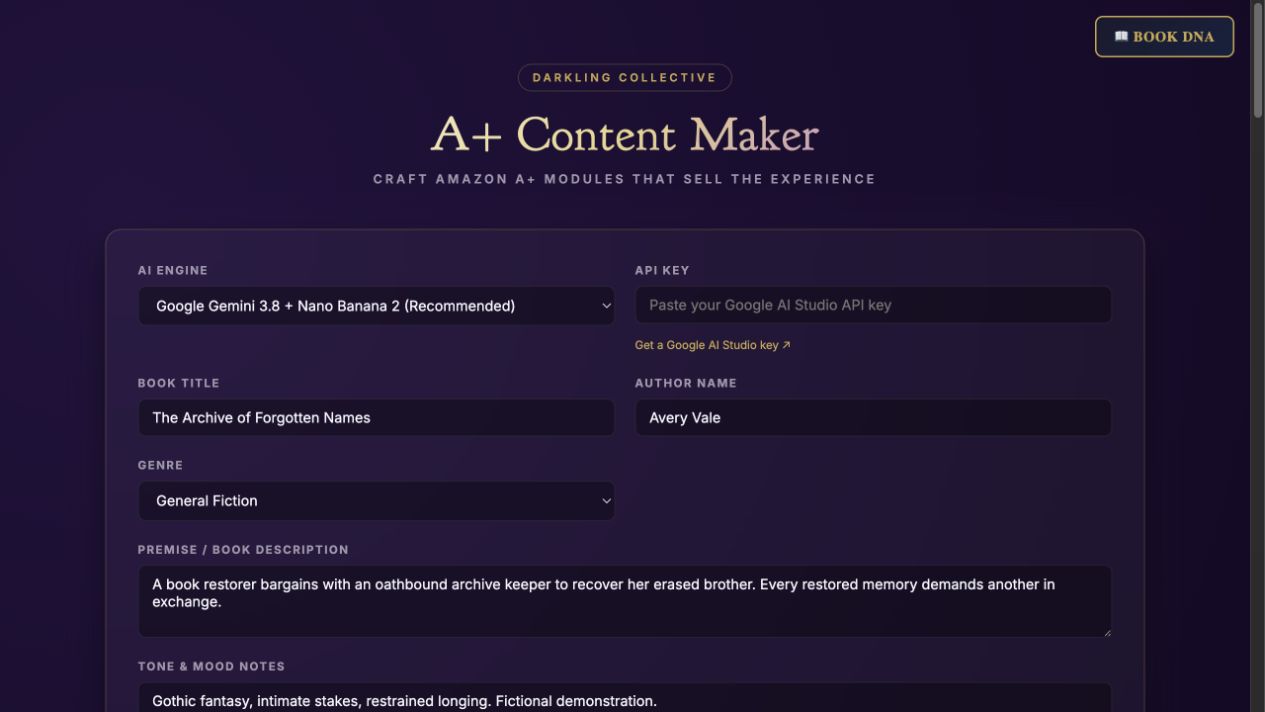
The screenshot shows a fictional gothic-fantasy book brief. A useful page could introduce the archive, the price of its magic, and Mara’s impossible choice—three distinct reasons to read, rather than three versions of the blurb.
Screenshots show the actual app interface. Book and author examples are fictional. Setup screens are labeled separately from generated results; interface details may vary by edition.
What you can do
A focused tool for a specific job.
- Hero and feature modules
- Give the page a clear opening and visual structure.
- Editable copy fields
- Refine headlines and descriptions directly.
- Image slots and dimensions
- See the assets each selected module needs.
- Optional image generation
- Use supported provider features when available.
- Module selection
- Keep the page focused instead of repeating the same pitch.
- Copy export
- Save the text before assembling the final page.
Learn before you choose
Watch the tool in use.
1:06 guided overview · Actual app captures · AI narration · English captions
Guided overview using setup screens and illustrative examples; generated results are not demonstrated.
Read the overview transcript
A Plus Content Maker helps plan the story you tell beyond the book blurb. Add your title, author, premise, genre, and tone. It is the browser tool included with the A Plus Content for Authors course, separate from the downloadable studio skill. For our fictional gothic fantasy, three useful module directions are the archive, the price of memory magic, and Mara's impossible choice. These are planning ideas. The app capture shows the book brief before generating module copy or images. Generate the module drafts, edit the copy, and keep a focused selection. Prepare images at the dimensions shown for each module, then save the text. Check the current requirements in your Amazon submission workflow before uploading. The written tutorial covers the tool's controls.
Before you start
What you need.
The store’s A+ Content for Authors course includes this browser tool. Supply images you can use and check current submission requirements inside Amazon before uploading. The KDP A+ Content Studio skill is a separate product.
AI access and usage
Connect a supported AI provider as shown in your edition. App access and AI usage are separate; provider availability and costs depend on your account. Read the API setup guide.
Keep a reviewed copy
Check the work against your actual project, then save or export the material you want to keep. Your final editorial and publishing choices remain yours.
A+ Content Maker
Get the course and included tool.
One-time course purchase, including A+ Content Maker.
Use your purchase license in My Library to open the tool.
Already own it? Open My LibraryThe course and tool are also included in the All Courses and Everything bundles.
Compare bundles →Keep exploring