Dev Edit
Find the revision that makes the whole story stronger.
Analyze your manuscript in saved, resumable segments. Follow findings to their supporting passages, review the whole-book overview, and build your revision plan.
$27 one-time app access · AI provider usage is separate.
Your workflow
From starting point to something useful.
Import the complete source
Create a named workspace, import TXT, Markdown, DOCX, EPUB or PDF, and set your genre and editorial intent.
Analyze and resume
Read every imported segment, save completed work, and resume unfinished analysis after interruption.
Review and prioritize
Check the exact supporting passages, mark decisions, add notes and export your editing plan.
A concrete example
See what the workflow looks like.
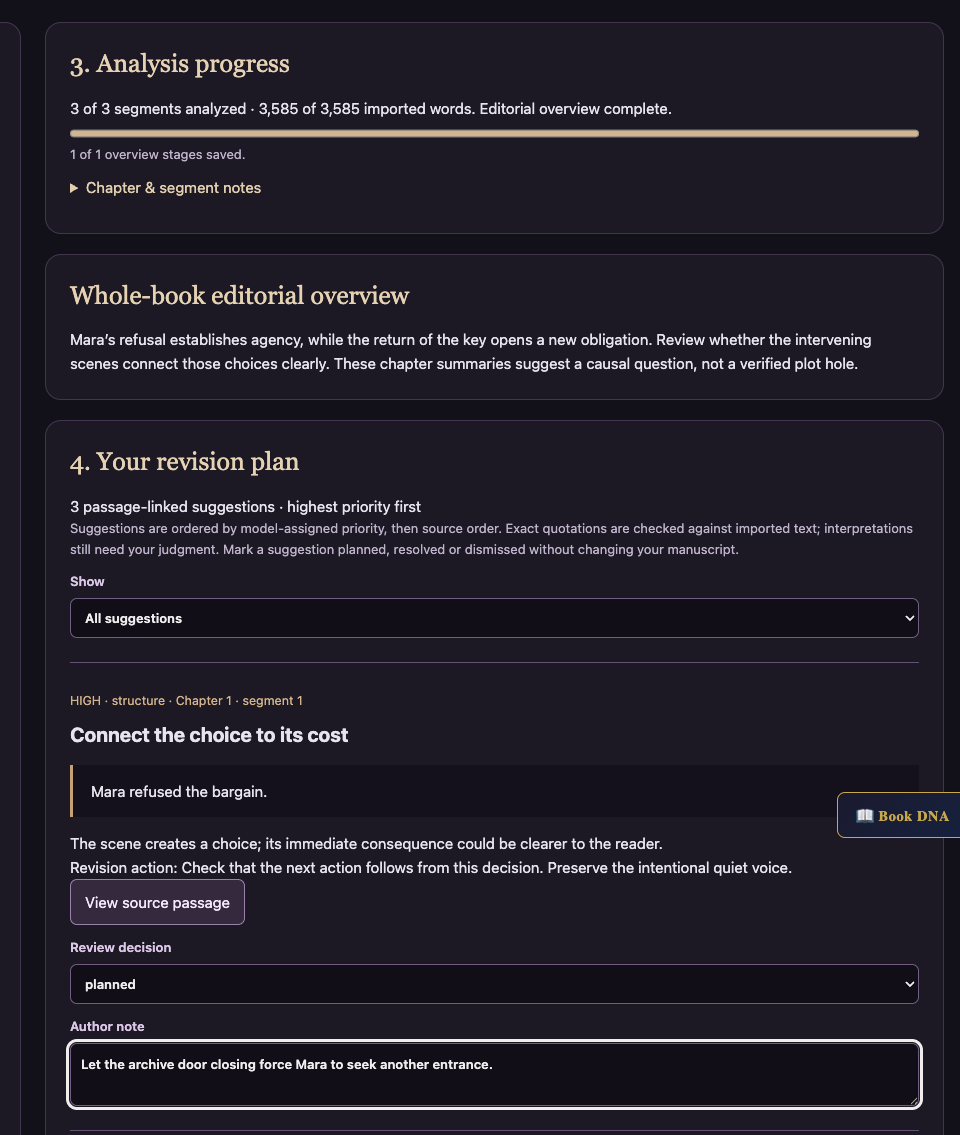
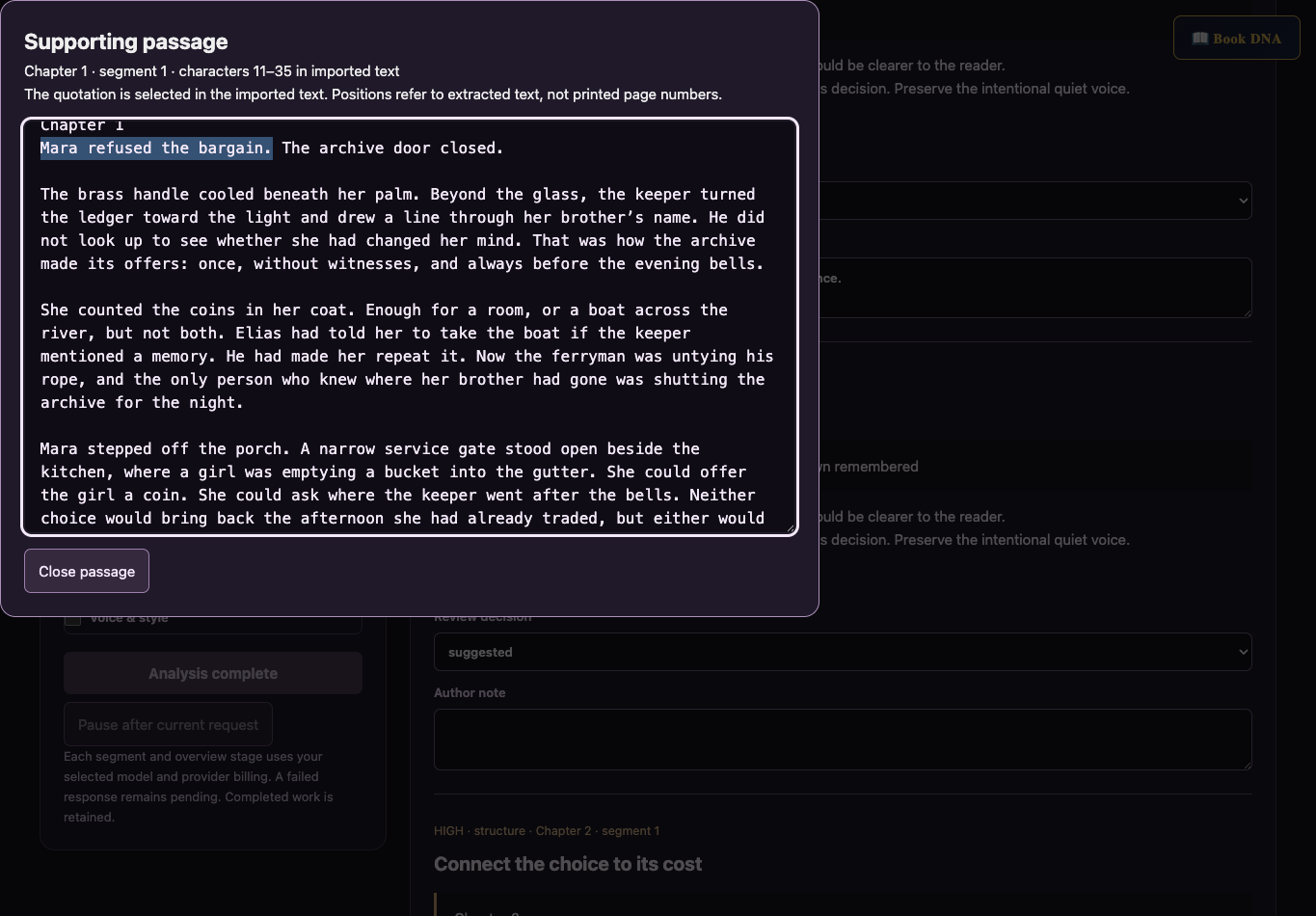
Fictional demonstration: Mara refuses a bargain. Dev Edit suggests checking whether that refusal causes the next event. The author follows the quoted passage, marks the suggestion planned, and adds a note while preserving the intended voice. Screenshots use controlled responses, not a live-model quality evaluation.
Screenshots show the actual app interface. Book and author examples are fictional. Setup screens are labeled separately from generated results; interface details may vary by edition.
What you can do
A focused tool for a specific job.
- Complete manuscript coverage
- Every imported character is retained. Up to 5 million characters per workspace and files up to 50 MB.
- Resumable analysis
- Completed segments and overview stages save independently. Failed responses remain pending.
- Passage-linked findings
- Quotations are checked against extracted text. Review the interpretation before revising.
- Whole-book overview
- An editorial synthesis of saved chapter summaries, with bounded stages for long manuscripts.
- Author-controlled revision plan
- Review priorities, mark planned/resolved/dismissed, and add notes without rewriting the source.
- Saved books and portable backups
- Separate manuscripts, browser autosave, recovery checkpoints, and backups without connection settings.
Learn before you choose
Watch the tool in use.
3:25 updated walkthrough · Actual app captures · Fictional example · Controlled responses · AI narration · English captions
Read the walkthrough transcript
Dev Edit now gives each manuscript a saved editorial workspace. This walkthrough uses a fictional story and controlled demonstration responses, with AI narration. Start with a title, then import a file or paste your text. The importer reads every PDF text page and follows the publisher’s chapter order in an EPUB. Scanned pages still need optical character recognition. The supported limits are shown beside the manuscript field. Choose full manuscript or chapter and scene mode. Enter your genre, your intended effect, and any boundaries the analysis should respect. Here, Mara’s quiet voice and deliberate refusal are intentional. Select the editorial focus, such as structure, pacing, character, or stakes. Choose your provider and model above the workspace. Each analysis request uses your provider account; saving and reviewing work do not require an AI key. Start analysis works through the imported manuscript in segments. The progress panel shows exactly how much text has been analyzed. Longer chapters may use several segments. Here, a simulated provider interruption leaves the first completed segment saved. Reopen the workspace and choose Resume analysis to continue with unfinished work. Pause after current request waits for the response already in progress, then saves it before stopping. After every segment is analyzed, Dev Edit builds an overview from the saved chapter summaries. Larger manuscripts use several summary stages so the whole book can be considered without one enormous request. This overview is an editorial interpretation, not proof that every story problem was found. Use the chapter notes to inspect its reasoning, and compare its suggestions with your intended story. The revision plan lists passage-linked suggestions, highest priority first. Each quotation must match the imported text before a finding is saved. Select View source passage to see that quotation selected in the original text. The positions refer to extracted text, not printed page numbers. Read the explanation and proposed action. Here, the author can strengthen the consequence of Mara’s refusal while keeping her quiet voice. Mark each suggestion planned, resolved, or dismissed, and add your own note. These decisions do not rewrite the manuscript. Export revision report gives you a readable editing plan. Export backup preserves the source, progress, findings, and review notes without connection settings. Importing a backup creates a separate workspace. Saves stay in this browser. A changed draft or brief starts a separate analysis revision, preserving the earlier report. Follow the updated written guide for the complete workflow.
Before you start
What you need.
Bring your provider key for AI analysis. Each segment and overview stage incurs your provider’s usage. Saves remain in this browser; export backups when moving devices. Scanned PDFs require OCR. Quotation matching verifies the cited text, not the correctness of an editorial interpretation.
AI access and usage
Connect a supported AI provider as shown in your edition. App access and AI usage are separate; provider availability and costs depend on your account. Read the API setup guide.
Keep a reviewed copy
Check the work against your actual project, then save or export the material you want to keep. Your final editorial and publishing choices remain yours.
Dev Edit
Put the tool to work.
One-time app purchase.
Use your purchase license in My Library to open the tool.
Already own it? Open My LibraryAlso available through the Full Marketing Suite and Everything Bundle.
Compare bundles →Keep exploring