PlotArchitect
Find the conflict that drives your story.
Develop a concrete premise, compare alternative directions, and approve the version you want to build. Keep story logic and promotional drafts together in a saved book workspace.
$27 one-time app access · AI provider usage is separate.
Your workflow
From starting point to something useful.
Set your story boundaries
Add your idea, genre, established facts, and intended ending. Manual editing needs no API key.
Develop and compare alternatives
Explore the protagonist’s goal, opposition, stakes, costly choice, and cause-and-effect spine. Keep earlier directions as you revise.
Approve and take the next step
Approve a reviewed snapshot, export Markdown, or optionally import an approved brief into Outline Expander.
A concrete example
See what the workflow looks like.
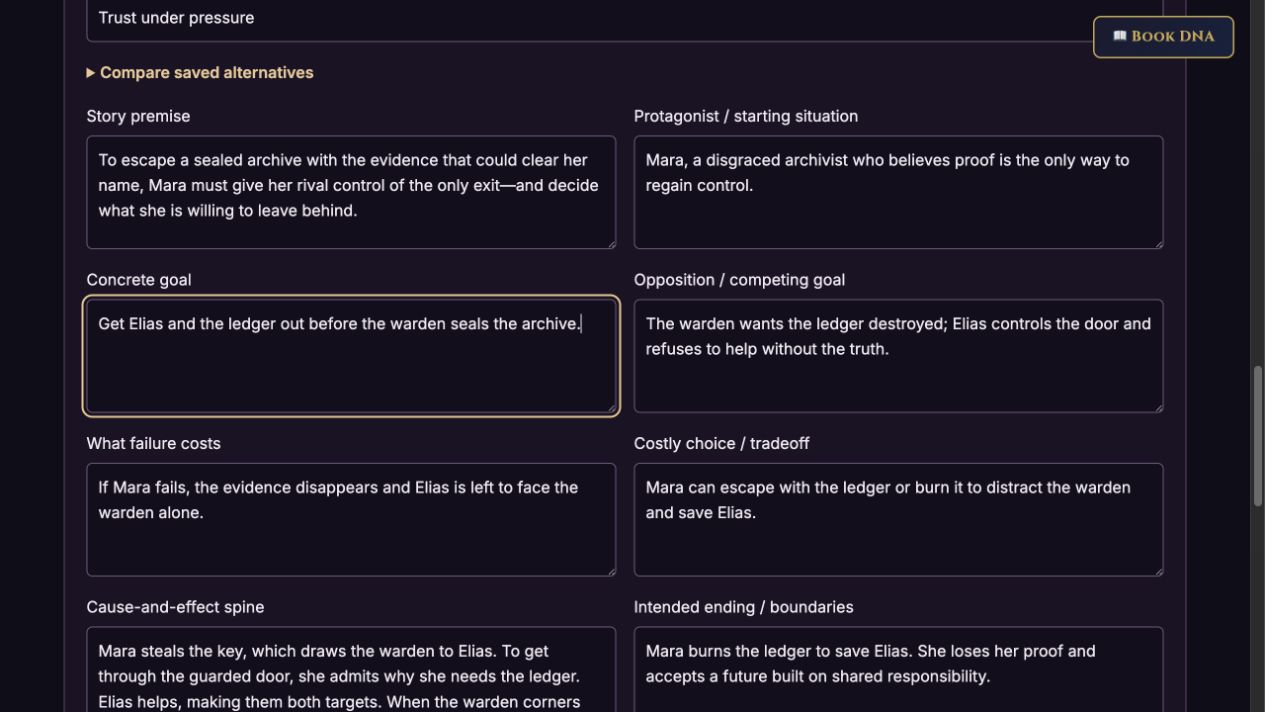
The Ash Door is a fictional example. Mara needs a ledger to clear her name, but saving Elias costs her the evidence. These actual app captures show editable story logic and alternative premises developed with a controlled demonstration response. Your model responses will vary.
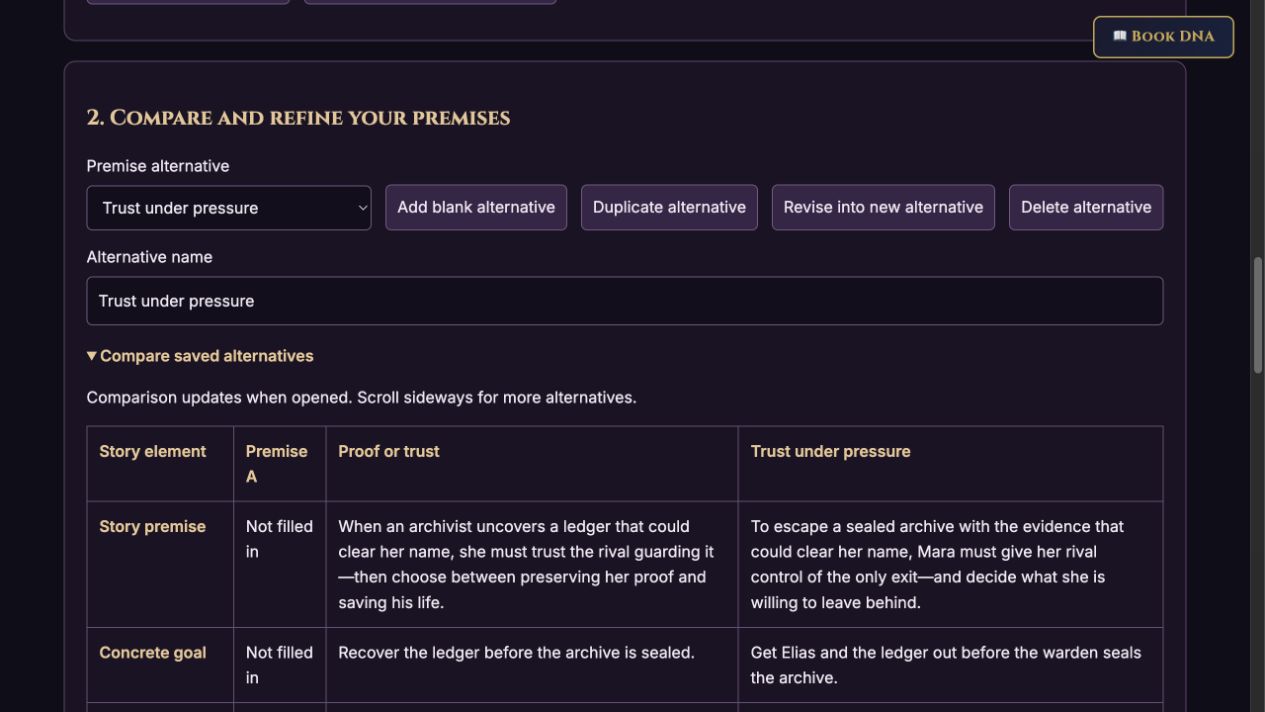
Screenshots show the actual app interface. Book and author examples are fictional. Setup screens are labeled separately from generated results; interface details may vary by edition.
What you can do
A focused tool for a specific job.
- Concrete story logic
- Connect the protagonist’s actions to opposition, consequences, and a meaningful ending.
- Independent alternatives
- Duplicate, edit, or generate a new premise without replacing your original; compare directions side by side.
- Approval before handoff
- Keep a reviewed snapshot. Changes to that approved version require a fresh review before export or Book DNA copying.
- Story-grounded positioning
- Retain tropes, a signature scene, a central dilemma, visual direction, TikTok captions, and X thread drafts.
- Saved books and recovery
- Local autosave, up to 20 version checkpoints, and portable JSON backups keep work organized.
- Optional companion workflow
- Import an approved JSON brief into Outline Expander as a separate book. Shared TeaserPro provider/model controls support AI drafting.
Learn before you choose
Watch the tool in use.
4:45 updated walkthrough · Actual app captures · Fictional example · Controlled responses · AI narration · English captions
Read the walkthrough transcript
PlotArchitect helps you develop the premise before you commit to a chapter outline. The refreshed app keeps your story brief, alternative premises, and approved direction in a saved book workspace. This walkthrough uses The Ash Door, a fictional example inside the actual app. The demonstration response is controlled, and the narration is AI generated. Your own model responses will vary. Start by naming the book you want to work on. Add your rough story notes, genre, tone, and reader promise. Use the boundaries field for established facts and the ending you want to preserve. Here, Mara wants a ledger that could clear her name, but ultimately burns the evidence to save Elias. We have not established a romance, so the brief says that explicitly. AI drafting uses the same provider and model controls as TeaserPro. Manual editing needs no API key. Develop new alternative creates a separate draft and keeps your earlier premises. Read the protagonist, concrete goal, active opposition, stakes, and costly choice. Then review the cause-and-effect spine. Mara’s theft draws the warden to Elias; trusting him makes them both targets; saving him costs her the proof. These are editable fields, and added details stay labeled as proposals. The job here is to clarify the story’s engine, not generate a full chapter plan. Duplicate an alternative to explore another emphasis manually, or use Revise into new alternative for an AI revision that preserves the source. Name each option so you can tell them apart. Compare saved alternatives puts the premise, goal, opposition, stakes, choice, and ending side by side. In our second version, getting Elias out becomes part of Mara’s explicit goal. Both versions remain available. Choose the direction that fits the story you want to tell. The story-positioning section retains the earlier tool’s promotional features: tropes and reader promise, a signature scene, the central dilemma, visual direction, a TikTok caption, and an X thread. Treat these as drafts. Check that the tropes are supported and that public captions do not reveal your ending. Visual direction can travel into TeaserPro by copying it, but no images are generated here. The app does not promise virality or publish social posts for you. Once you have reviewed the story facts, ending, and proposed additions, approve the selected premise. Approval keeps a snapshot separate from working drafts. Editing that approved alternative makes its approval stale, so you must review and approve again before handing it off. Editing another alternative does not change the approved one. Save a version before a major change, and use Restore version to recover the earlier workspace when needed. Export approved planning brief creates a JSON file for Outline Expander. In Outline Expander, use Import backup or PlotArchitect brief. The import opens a new book with the premise, story logic, ending, and boundaries as its brief. Existing outlines stay intact, and chapter generation is a separate action. Outline Expander is optional and requires its own access. You can also export the selected premise as Markdown and use it with any planning workflow. PlotArchitect autosaves in this browser. Download backup keeps a portable copy, and importing a backup opens a separate book workspace. Copy approved to active Book DNA is an explicit action: confirm the active project before replacing its premise and related fields. Generation no longer does this automatically. Open the refreshed app through your existing standalone purchase or member access. Find the updated screenshots and guide at darkling collective store dot com slash plotarchitect.
Before you start
What you need.
Bring a rough premise and any story facts you want to preserve. Open the app through your standalone purchase or existing Suite, Premium, or VIP access. AI drafting uses your selected provider’s key and billing; manual editing needs no key. Outline Expander is optional and requires its own access.
AI access and usage
Connect a supported AI provider as shown in your edition. App access and AI usage are separate; provider availability and costs depend on your account. Read the API setup guide.
Keep a reviewed copy
Check the work against your actual project, then save or export the material you want to keep. Your final editorial and publishing choices remain yours.
PlotArchitect
Put the tool to work.
One-time app purchase.
Use your purchase license in My Library to open the tool.
Already own it? Open My LibraryAlso available through the Full Marketing Suite and Everything Bundle.
Compare bundles →Keep exploring