Theme Weaver
Make the symbols mean something.
Build evolving motif arcs around concrete choices, characters, and scenes. Keep an editable book workspace and review theme suggestions before changing your story.
Classroom browser tool · AI provider usage is separate.
Your workflow
From starting point to something useful.
Set the story boundaries
Name the thematic conflict, tone, ending, and motifs. Start from your own notes or optional reference imports.
Develop the changing meaning
Draft or manually build motif arcs, then link story moments to scenes and characters with an action, meaning, and consequence.
Review and revise deliberately
Assess quoted suggestions, keep version checkpoints, and export a guide or portable backup.
A concrete example
See what the workflow looks like.
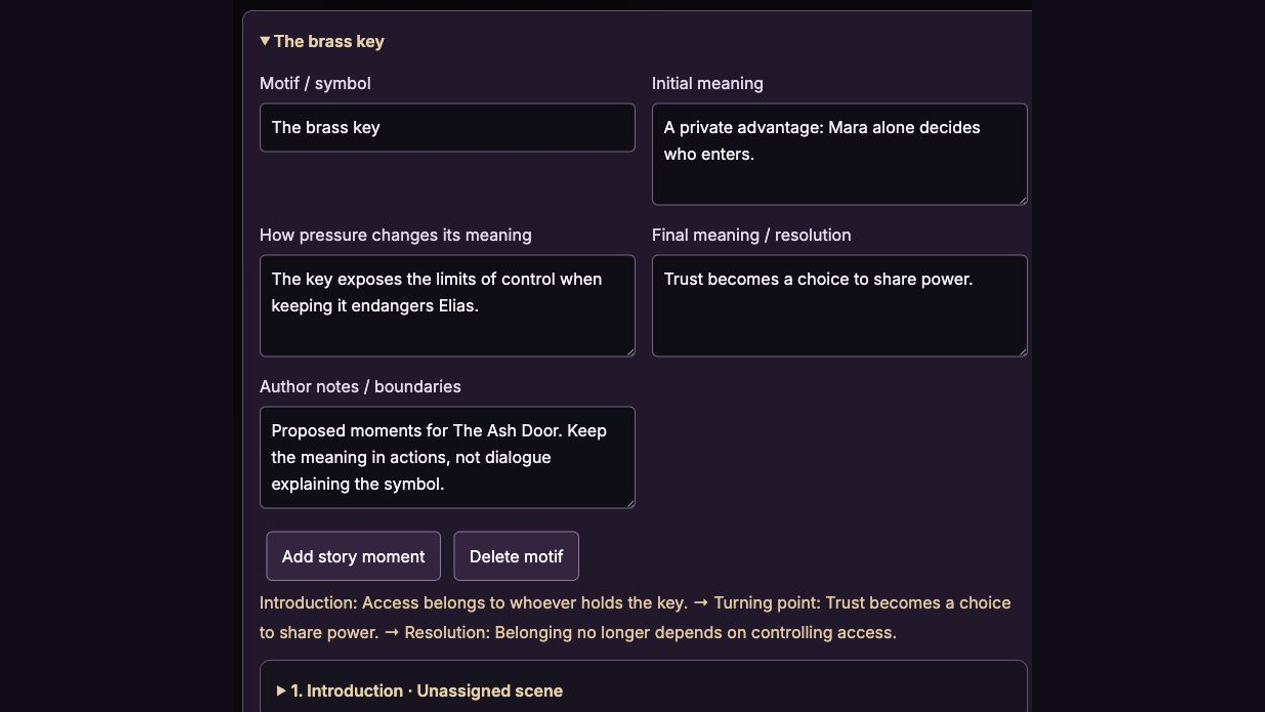
The Ash Door is a fictional example: a brass key begins as Mara’s private advantage, becomes a costly act of trust, and ends as shared responsibility. These actual app captures show a developed guide created with a controlled demonstration response, plus a scene-linked turning point.
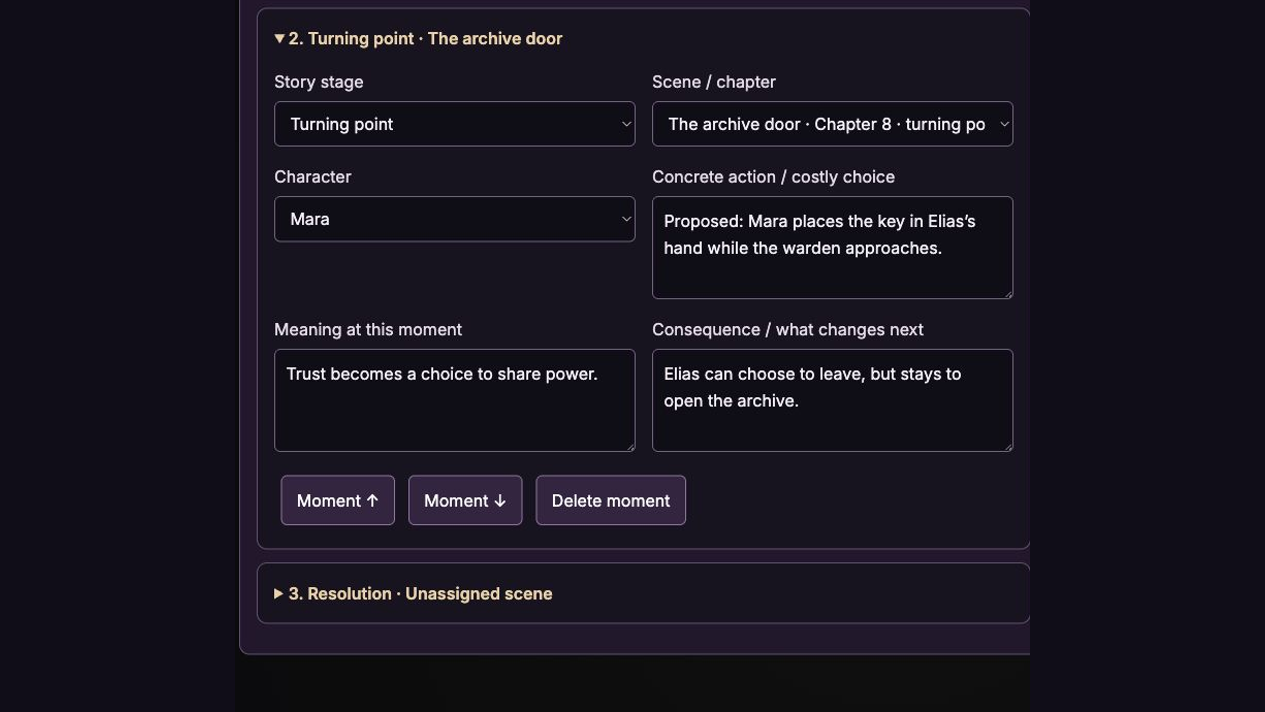
Screenshots show the actual app interface. Book and author examples are fictional. Setup screens are labeled separately from generated results; interface details may vary by edition.
What you can do
A focused tool for a specific job.
- Evolving motif arcs
- Track initial meaning, turning pressure, and final meaning.
- Linked story moments
- Connect concrete choices and consequences to a named character, chapter, and scene.
- Evidence-based review
- Consider suggestions for repetition, dropped threads, and over-explicit symbolism; accept or dismiss without automatic rewriting.
- Optional story references
- Import an Outline Expander backup or approved Character Weaver dossier, or add manual entries. Imports are editable snapshots.
- Saved book workspaces
- Browser autosave, up to 20 version checkpoints, and portable backups keep books separate.
- Your model and your workflow
- Shared TeaserPro provider/model controls for AI work; manual editing requires no API key. Copy to Book DNA only when you choose.
Learn before you choose
Watch the tool in use.
4:40 updated walkthrough · Actual app captures · Fictional example · Controlled responses · AI narration · English captions
Read the walkthrough transcript
Theme Weaver helps you turn a thematic idea into concrete story choices. This updated workspace keeps your book brief, evolving motifs, linked story moments and review suggestions together. We are using The Ash Door, a fictional example inside the actual app. The demonstration responses are controlled examples, and this narration is AI generated. Your own model responses will vary. Start with a named book workspace. Enter the core question your story is testing. Here, Mara wants certainty, but must learn to share control. Add a few motifs, your tone, and the story boundaries you want preserved. Our brass archive key begins as a private advantage. The ending stays fixed: Mara chooses to save Elias at the cost of her evidence. AI drafting uses the same provider and model controls as TeaserPro. Manual editing needs no API key. Weave Theme creates an editable draft. Each motif has an initial meaning, a turning pressure, and a final meaning. The key first gives Mara control over who enters. Later, keeping it puts Elias at risk. By the end, sharing access becomes an act of trust. Use the notes field to protect your intended ambiguity. These are planning notes; the finished scene can express the meaning through action instead of explanation. Open a story moment and give it a stage, a scene, and a character. At the turning point, Mara puts the key in Elias’s hand while the warden approaches. That choice gives Elias the freedom to leave. He stays and opens the archive. The consequence changes what happens next. Edit all three fields to fit your story. Unassigned moments remain proposed placements until you connect them to a real scene. Under Characters and scenes, add manual reference entries for any book. You can also import an Outline Expander backup or an approved Character Weaver dossier. The imported entries are editable snapshots, not a live connection. Reimporting updates matching identifiers and keeps older unmatched entries for your review. Neither companion tool is required. Check character development and scene details before using them as generation context. Open Review suggestions and structural reminders. The app flags missing resolution moments, unassigned scenes, and repeated meaning text for your consideration. The AI review looks for supported concerns in the supplied plan, including repetition, dropped threads, and overly explicit symbolism. It quotes the plan and offers an optional revision. This is not a review of an unseen manuscript. Here, the suggestion is to let Mara hand over the key without explaining trust. Mark a suggestion accepted, dismissed, or open. Accepting records your decision; it does not rewrite the guide. Apply the edits you want yourself. If you change the plan, the app marks the review as referring to an earlier version. Save a version before a major revision, and restore it when needed. New generated guides also retain the previous guide in version history. Incomplete model responses leave your saved guide in place. Work autosaves in this browser. Download backup creates a portable file, and importing it opens a separate book workspace. Export guide gives you Markdown for drafting or revision. Copy to active Book DNA is a deliberate replacement that asks for confirmation. Suite and VIP members use their existing browser access. Standalone owners receive the updated installable skill, and Premium members can use the tutorial. Watch again at darkling collective store dot com slash theme weaver.
Before you start
What you need.
Bring a thematic conflict and story context. Suite and VIP include the browser app through existing member access. Premium includes the tutorial. Standalone purchases and the Author Skills bundle supply the separate installable skill; they do not unlock this browser app.
AI access and usage
Connect a supported AI provider as shown in your edition. App access and AI usage are separate; provider availability and costs depend on your account. Read the API setup guide.
Keep a reviewed copy
Check the work against your actual project, then save or export the material you want to keep. Your final editorial and publishing choices remain yours.
Theme Weaver
Use your classroom tool link.
This page shows the browser tool described in the Darkling classroom. Follow your existing classroom link to open it, and use the free walkthrough for setup.
Open the setup walkthroughClassroom guidePrefer an installable workflow? The Author Skills collection includes a separate skill with this name. A skill purchase supplies the downloadable skill, rather than the browser app shown here.
Explore Author Skills →Keep exploring