Ruthless Editor
Sharper prose. Still unmistakably yours.
Compare exact passages with proposed edits, protect intentional wording, and build a revised draft from changes you choose.
$27 one-time app access · AI provider usage is separate.
Your workflow
From starting point to something useful.
Set your editorial brief
Import a scene, chapter or complete manuscript. Add your intent, own voice sample and protected phrases.
Review each proposal
Compare original and replacement, inspect the source, and accept, reject or revise the wording.
Export your decisions
Export a draft containing only accepted edits, keep the original source, and save a portable backup.
A concrete example
See what the workflow looks like.
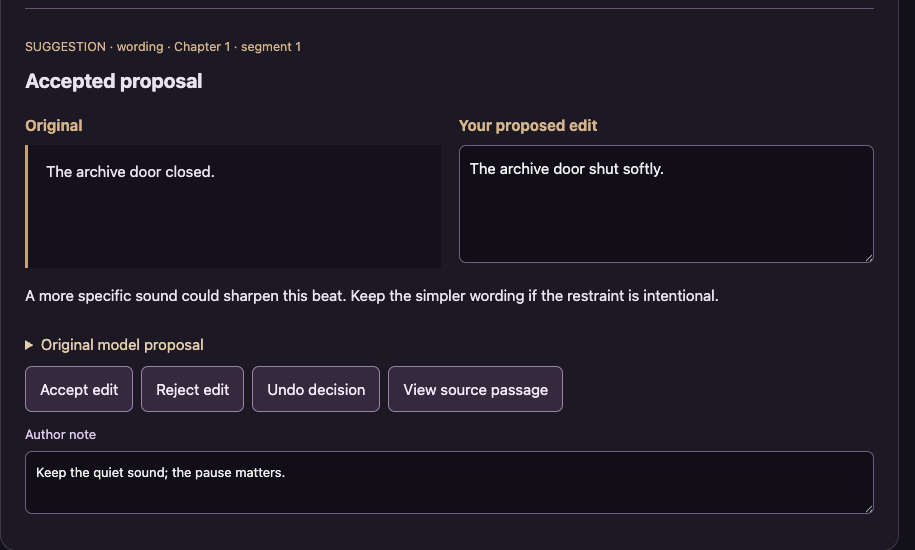
Fictional demonstration with controlled responses: the author changes “The archive door closed.” to “The archive door shut softly.” and accepts that wording. “Mara refused the bargain.” stays unchanged because it is protected. These are demonstration choices, not claims about live model quality.
Screenshots show the actual app interface. Book and author examples are fictional. Setup screens are labeled separately from generated results; interface details may vary by edition.
What you can do
A focused tool for a specific job.
- Original beside proposal
- Inspect exact source text and edit the replacement before deciding.
- Protected wording
- Block acceptance of proposals that overlap your exact protected phrases.
- Author-controlled changes
- Accept, reject or undo individual edits. Overlapping alternatives cannot both apply.
- Resumable analysis
- Save each completed segment; interrupted or invalid responses stay pending.
- Named manuscripts and backups
- Keep separate books and analysis passes with recovery checkpoints.
- Accepted draft and review report
- Export plain-text originals and edited drafts, plus decisions and notes.
Learn before you choose
Watch the tool in use.
3:37 updated walkthrough · Actual app captures · Fictional example · Controlled responses · AI narration · English captions
Read the walkthrough transcript
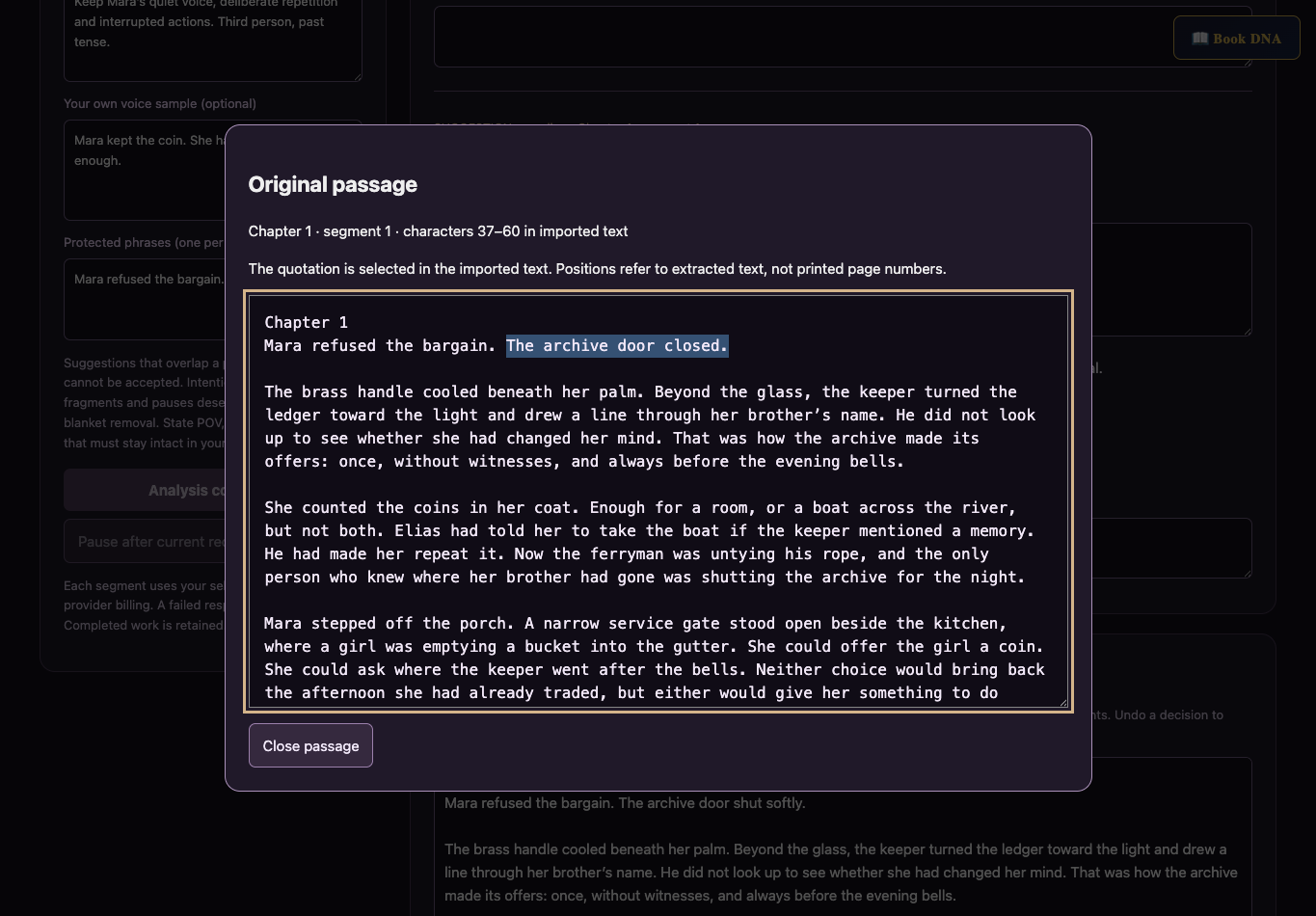
Ruthless Editor now gives you a saved workspace for line editing, with the original manuscript preserved. This walkthrough uses a fictional story and controlled demonstration responses, with AI narration. Name your manuscript, then paste a scene or import a file. Text, Markdown, Word, EPUB and PDF are supported. Scanned PDFs need optical character recognition. Imports preserve extracted text, not Word formatting. Review the imported text before analysis. Enter your genre and editorial boundaries. State the point of view, tense, and effects you want to keep. You can add a sample of your own writing as context. Put exact wording you want to preserve in Protected phrases, one phrase per line. Those matches are case sensitive. Proposals that overlap a protected phrase cannot be accepted. Intentional repetition, fragments and pauses should be judged in context, not automatically removed. Choose your provider and model, then start analysis. Each segment uses your provider account. The progress panel shows exactly how much imported text has been analyzed. Here, a simulated interruption leaves completed work saved and the remaining segments pending. Reopen this workspace and choose Resume analysis to continue. Pause after current request waits for the current response to finish and save. An interrupted chapter is never presented as a clean result. Each proposal shows the original passage beside an editable replacement. Read the reason and decide whether the change serves your story. Accept edit includes it in the edited draft. Reject edit leaves the original wording. You can change the proposed replacement yourself. Changing it resets the decision to pending, so you must accept the revised wording again. Two overlapping alternatives cannot both be accepted. An empty replacement means deletion, so review that choice carefully. Select View source passage to inspect the original wording in context. Its positions refer to imported text, not printed page numbers. Only the matched occurrence changes when you accept a proposal. Repeated phrases elsewhere remain untouched. Undo decision returns the proposal to pending and restores the original wording in the edited draft. The model can still misunderstand your intention. Matching the quotation proves where it came from, not that its editing advice is correct. The edited draft contains only accepted changes. Everything else stays as imported, including segments that have not been analyzed. Export the edited draft, original source or review report as needed. Export backup keeps your source, progress, proposals and decisions without connection settings. Importing a backup creates a separate workspace. Saves stay in this browser, so export before changing devices or clearing browser data. Changing the source or brief starts a separate analysis pass and preserves the earlier work.
Before you start
What you need.
Resolve major story problems first. State your intended meaning, POV, tense and deliberate repetition. Model suggestions require judgment. Imports preserve extracted text rather than document formatting; scanned PDFs need OCR.
AI access and usage
Connect a supported AI provider as shown in your edition. App access and AI usage are separate; provider availability and costs depend on your account. Read the API setup guide.
Keep a reviewed copy
Check the work against your actual project, then save or export the material you want to keep. Your final editorial and publishing choices remain yours.
Ruthless Editor
Put the tool to work.
One-time app purchase.
Use your purchase license in My Library to open the tool.
Already own it? Open My LibraryAlso available through the Full Marketing Suite and Everything Bundle.
Compare bundles →Keep exploring